> ## Documentation Index
> Fetch the complete documentation index at: https://docs.awaithumans.dev/llms.txt
> Use this file to discover all available pages before exploring further.
# Slack
> Deliver tasks via Slack. Block Kit modal review, NL thread replies, broadcast claim, signed dashboard handoff for Slack-only users.
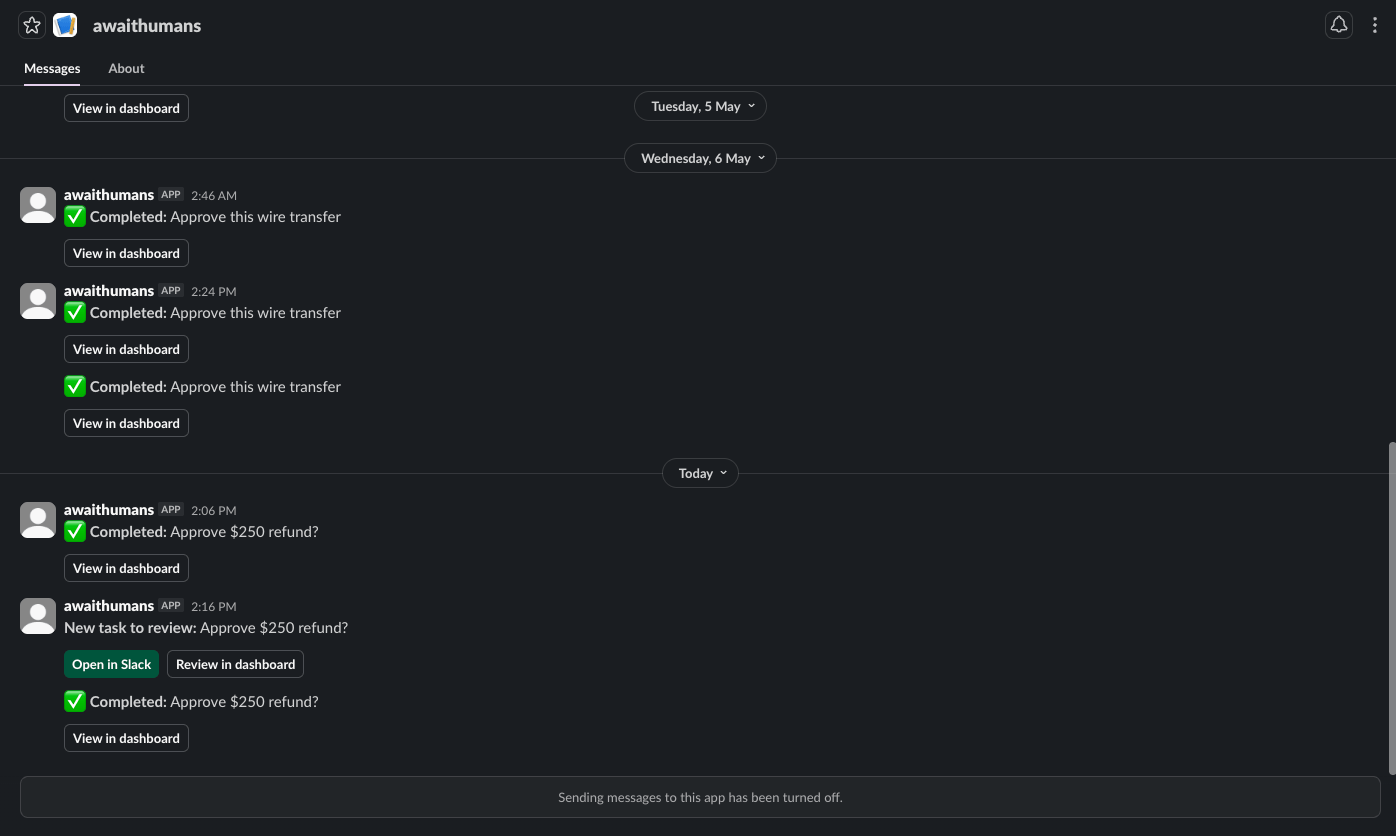
The Slack channel posts tasks to a channel or DM, opens a Block Kit modal for the form, and accepts both structured submissions and natural-language thread replies (parsed by the [verifier](/adapters/verifier)). Reviewers without an email/password get a signed handoff URL that drops them into the dashboard authenticated.
 ## Two install modes
**Static-token (single workspace)** — fastest setup. One bot token in env, all tasks posted to that workspace. Use this for self-hosted deployments where one team owns the awaithumans server.
**OAuth (multi-workspace)** — for distribution scenarios where multiple Slack workspaces install your app. The dashboard's Settings → Slack page handles the install flow.
For your first run, start with static-token.
## Static-token setup
### 1. Create a Slack app
Go to [api.slack.com/apps](https://api.slack.com/apps) → Create New App → From manifest. Paste:
```yaml theme={"system"}
display_information:
name: Await Humans
features:
bot_user:
display_name: Await Humans
always_online: true
oauth_config:
scopes:
bot:
- chat:write
- im:write
- channels:read
- groups:read
- users:read
- users:read.email
- files:write
- files:read
settings:
interactivity:
is_enabled: true
request_url: https://YOUR-PUBLIC-URL/api/channels/slack/interactions
org_deploy_enabled: false
socket_mode_enabled: false
token_rotation_enabled: false
```
Replace `YOUR-PUBLIC-URL` with your awaithumans server's public address. For local dev: `https://.ngrok.io`. The `users:read.email` scope is needed for the `slack:alice@acme.com` route format (resolves emails to Slack user IDs).
Install the app to your workspace. Two values to copy — they live on **different pages** in the Slack admin UI:
* **Bot User OAuth Token** (`xoxb-...`) — left sidebar: **Features → OAuth & Permissions**. The token is in the **OAuth Tokens** section at the top of that page.
* **Signing Secret** — left sidebar: **Settings → Basic Information**. Scroll to **App Credentials**; the signing secret is in that block.
### 2. Set env vars
```bash theme={"system"}
export AWAITHUMANS_SLACK_BOT_TOKEN=xoxb-...
export AWAITHUMANS_SLACK_SIGNING_SECRET=your-signing-secret
```
Restart `awaithumans dev`. The dashboard's Settings → Slack page now shows the workspace as a read-only "env" entry.
### 3. Test it
Save as `slack_test.py` and run with `python slack_test.py`:
```python theme={"system"}
from pydantic import BaseModel
from awaithumans import await_human_sync
class RefundRequest(BaseModel):
order_id: str
customer_email: str
amount_usd: int
reason: str
class RefundDecision(BaseModel):
approved: bool
notes: str | None = None
def main() -> None:
decision = await_human_sync(
task="Approve $250 refund?",
payload_schema=RefundRequest,
payload=RefundRequest(
order_id="A-4721",
customer_email="alex@example.com",
amount_usd=250,
reason="Duplicate charge",
),
response_schema=RefundDecision,
timeout_seconds=900,
notify=["slack:#general"], # any channel your bot is invited to
)
print(f"approved={decision.approved} · notes={decision.notes}")
if __name__ == "__main__":
main()
```
The bot posts the task to `#general`. Click **Review**, fill the modal, submit. The script's `await_human_sync` returns and prints the typed `RefundDecision`. Swap the channel to whatever your bot has been invited to.
## OAuth setup
Set `AWAITHUMANS_SLACK_CLIENT_ID`, `AWAITHUMANS_SLACK_CLIENT_SECRET`, `AWAITHUMANS_SLACK_SIGNING_SECRET`, and `AWAITHUMANS_SLACK_INSTALL_TOKEN` (operator-only secret you share with admins who can install).
Open `https://YOUR-PUBLIC-URL/api/channels/slack/oauth/start?install_token=YOUR_TOKEN` to kick off the install. After consent, the workspace appears in Settings → Slack.
OAuth installs are stored encrypted at rest (AES-GCM keyed off `PAYLOAD_KEY`).
## Adding users to the directory
Tasks DM'd to a Slack user only open the modal if that user exists in the awaithumans directory. Add them via:
**Dashboard → Users → Add user**. The form has a "Slack member" picker that pulls the workspace's `users.list` so operators select from a dropdown rather than copy-pasting `U…` IDs. The display name auto-fills. Email is optional — a Slack-only user (no email, no password) can still complete tasks; they reach the dashboard via the signed handoff URL the bot puts on every DM.
## Notify formats
```python theme={"system"}
notify=["slack:#approvals"] # broadcast to channel — first claim wins
notify=["slack:@alice"] # DM by Slack handle (auto-resolved)
notify=["slack:@U01ABC1234"] # DM by raw user ID (also works)
notify=["slack:alice@acme.com"] # DM by email (uses users.lookupByEmail)
notify=["slack:#approvals", "email:..."] # multi-channel
```
The middle three forms can target the same person — pick whichever's easiest. Handles (`@alice`) are resolved via `users.list` once per workspace per process, then cached. Emails use Slack's dedicated `users.lookupByEmail`. Raw user IDs pass through unchanged.
For a multi-workspace OAuth install, suffix the channel/handle with the team:
```python theme={"system"}
notify=["slack+T123456:@alice"] # DM Alice in workspace T123456
notify=["slack+T_OTHER:#approvals"] # broadcast in a different workspace's channel
```
### Broadcast (channel)
Posts a message with a "Claim this task" button. First clicker wins atomically. After claim:
* The original message updates to "Claimed by @user" so the button vanishes for everyone else
* The modal pops for the claimer immediately (using Slack's interactivity trigger)
* The "View in dashboard" button on the updated message is now signed for the claimer (handoff URL — see below)
* Audit log records the claim with channel=`slack`
### Direct (user)
DMs the Slack user with two buttons: **Approve in Slack** (opens the modal in place) and **Open in Dashboard** (signed handoff URL — works even if the user has no email/password).
The implicit-assignee derivation pins the recipient as `assigned_to_user_id` at task-create time, so the Slack `view_submission` auth check accepts their submission. Without this, a DM to `@alice` would surface "This task isn't assigned to you" when she clicks through.
## Signed dashboard handoff (Slack-only users)
A Slack-only user (no email, no password in the directory) has no way to clear the dashboard's login wall — clicking "Open in Dashboard" without help would bounce them to `/login`. The notifier signs the URL with `(user_id, task_id, expiry, hmac)` at post time:
```
https://YOUR-PUBLIC-URL/api/auth/slack-handoff?u=USER&t=TASK&e=EXP&s=SIG
```
The endpoint verifies the signature, mints a session cookie scoped to that user, and redirects to `/task?id=TASK`. Stateless HMAC, HKDF-derived key from `PAYLOAD_KEY`, no DB roundtrip on the verify path.
TTL is bound to `task.timeout_at` — a 7-day approval has a working link on day 6. Expired links return 400.
The post-claim "View in dashboard" button on broadcast messages is also signed, so claimers without password credentials get the same handoff.
## Modal form
## Two install modes
**Static-token (single workspace)** — fastest setup. One bot token in env, all tasks posted to that workspace. Use this for self-hosted deployments where one team owns the awaithumans server.
**OAuth (multi-workspace)** — for distribution scenarios where multiple Slack workspaces install your app. The dashboard's Settings → Slack page handles the install flow.
For your first run, start with static-token.
## Static-token setup
### 1. Create a Slack app
Go to [api.slack.com/apps](https://api.slack.com/apps) → Create New App → From manifest. Paste:
```yaml theme={"system"}
display_information:
name: Await Humans
features:
bot_user:
display_name: Await Humans
always_online: true
oauth_config:
scopes:
bot:
- chat:write
- im:write
- channels:read
- groups:read
- users:read
- users:read.email
- files:write
- files:read
settings:
interactivity:
is_enabled: true
request_url: https://YOUR-PUBLIC-URL/api/channels/slack/interactions
org_deploy_enabled: false
socket_mode_enabled: false
token_rotation_enabled: false
```
Replace `YOUR-PUBLIC-URL` with your awaithumans server's public address. For local dev: `https://.ngrok.io`. The `users:read.email` scope is needed for the `slack:alice@acme.com` route format (resolves emails to Slack user IDs).
Install the app to your workspace. Two values to copy — they live on **different pages** in the Slack admin UI:
* **Bot User OAuth Token** (`xoxb-...`) — left sidebar: **Features → OAuth & Permissions**. The token is in the **OAuth Tokens** section at the top of that page.
* **Signing Secret** — left sidebar: **Settings → Basic Information**. Scroll to **App Credentials**; the signing secret is in that block.
### 2. Set env vars
```bash theme={"system"}
export AWAITHUMANS_SLACK_BOT_TOKEN=xoxb-...
export AWAITHUMANS_SLACK_SIGNING_SECRET=your-signing-secret
```
Restart `awaithumans dev`. The dashboard's Settings → Slack page now shows the workspace as a read-only "env" entry.
### 3. Test it
Save as `slack_test.py` and run with `python slack_test.py`:
```python theme={"system"}
from pydantic import BaseModel
from awaithumans import await_human_sync
class RefundRequest(BaseModel):
order_id: str
customer_email: str
amount_usd: int
reason: str
class RefundDecision(BaseModel):
approved: bool
notes: str | None = None
def main() -> None:
decision = await_human_sync(
task="Approve $250 refund?",
payload_schema=RefundRequest,
payload=RefundRequest(
order_id="A-4721",
customer_email="alex@example.com",
amount_usd=250,
reason="Duplicate charge",
),
response_schema=RefundDecision,
timeout_seconds=900,
notify=["slack:#general"], # any channel your bot is invited to
)
print(f"approved={decision.approved} · notes={decision.notes}")
if __name__ == "__main__":
main()
```
The bot posts the task to `#general`. Click **Review**, fill the modal, submit. The script's `await_human_sync` returns and prints the typed `RefundDecision`. Swap the channel to whatever your bot has been invited to.
## OAuth setup
Set `AWAITHUMANS_SLACK_CLIENT_ID`, `AWAITHUMANS_SLACK_CLIENT_SECRET`, `AWAITHUMANS_SLACK_SIGNING_SECRET`, and `AWAITHUMANS_SLACK_INSTALL_TOKEN` (operator-only secret you share with admins who can install).
Open `https://YOUR-PUBLIC-URL/api/channels/slack/oauth/start?install_token=YOUR_TOKEN` to kick off the install. After consent, the workspace appears in Settings → Slack.
OAuth installs are stored encrypted at rest (AES-GCM keyed off `PAYLOAD_KEY`).
## Adding users to the directory
Tasks DM'd to a Slack user only open the modal if that user exists in the awaithumans directory. Add them via:
**Dashboard → Users → Add user**. The form has a "Slack member" picker that pulls the workspace's `users.list` so operators select from a dropdown rather than copy-pasting `U…` IDs. The display name auto-fills. Email is optional — a Slack-only user (no email, no password) can still complete tasks; they reach the dashboard via the signed handoff URL the bot puts on every DM.
## Notify formats
```python theme={"system"}
notify=["slack:#approvals"] # broadcast to channel — first claim wins
notify=["slack:@alice"] # DM by Slack handle (auto-resolved)
notify=["slack:@U01ABC1234"] # DM by raw user ID (also works)
notify=["slack:alice@acme.com"] # DM by email (uses users.lookupByEmail)
notify=["slack:#approvals", "email:..."] # multi-channel
```
The middle three forms can target the same person — pick whichever's easiest. Handles (`@alice`) are resolved via `users.list` once per workspace per process, then cached. Emails use Slack's dedicated `users.lookupByEmail`. Raw user IDs pass through unchanged.
For a multi-workspace OAuth install, suffix the channel/handle with the team:
```python theme={"system"}
notify=["slack+T123456:@alice"] # DM Alice in workspace T123456
notify=["slack+T_OTHER:#approvals"] # broadcast in a different workspace's channel
```
### Broadcast (channel)
Posts a message with a "Claim this task" button. First clicker wins atomically. After claim:
* The original message updates to "Claimed by @user" so the button vanishes for everyone else
* The modal pops for the claimer immediately (using Slack's interactivity trigger)
* The "View in dashboard" button on the updated message is now signed for the claimer (handoff URL — see below)
* Audit log records the claim with channel=`slack`
### Direct (user)
DMs the Slack user with two buttons: **Approve in Slack** (opens the modal in place) and **Open in Dashboard** (signed handoff URL — works even if the user has no email/password).
The implicit-assignee derivation pins the recipient as `assigned_to_user_id` at task-create time, so the Slack `view_submission` auth check accepts their submission. Without this, a DM to `@alice` would surface "This task isn't assigned to you" when she clicks through.
## Signed dashboard handoff (Slack-only users)
A Slack-only user (no email, no password in the directory) has no way to clear the dashboard's login wall — clicking "Open in Dashboard" without help would bounce them to `/login`. The notifier signs the URL with `(user_id, task_id, expiry, hmac)` at post time:
```
https://YOUR-PUBLIC-URL/api/auth/slack-handoff?u=USER&t=TASK&e=EXP&s=SIG
```
The endpoint verifies the signature, mints a session cookie scoped to that user, and redirects to `/task?id=TASK`. Stateless HMAC, HKDF-derived key from `PAYLOAD_KEY`, no DB roundtrip on the verify path.
TTL is bound to `task.timeout_at` — a 7-day approval has a working link on day 6. Expired links return 400.
The post-claim "View in dashboard" button on broadcast messages is also signed, so claimers without password credentials get the same handoff.
## Modal form
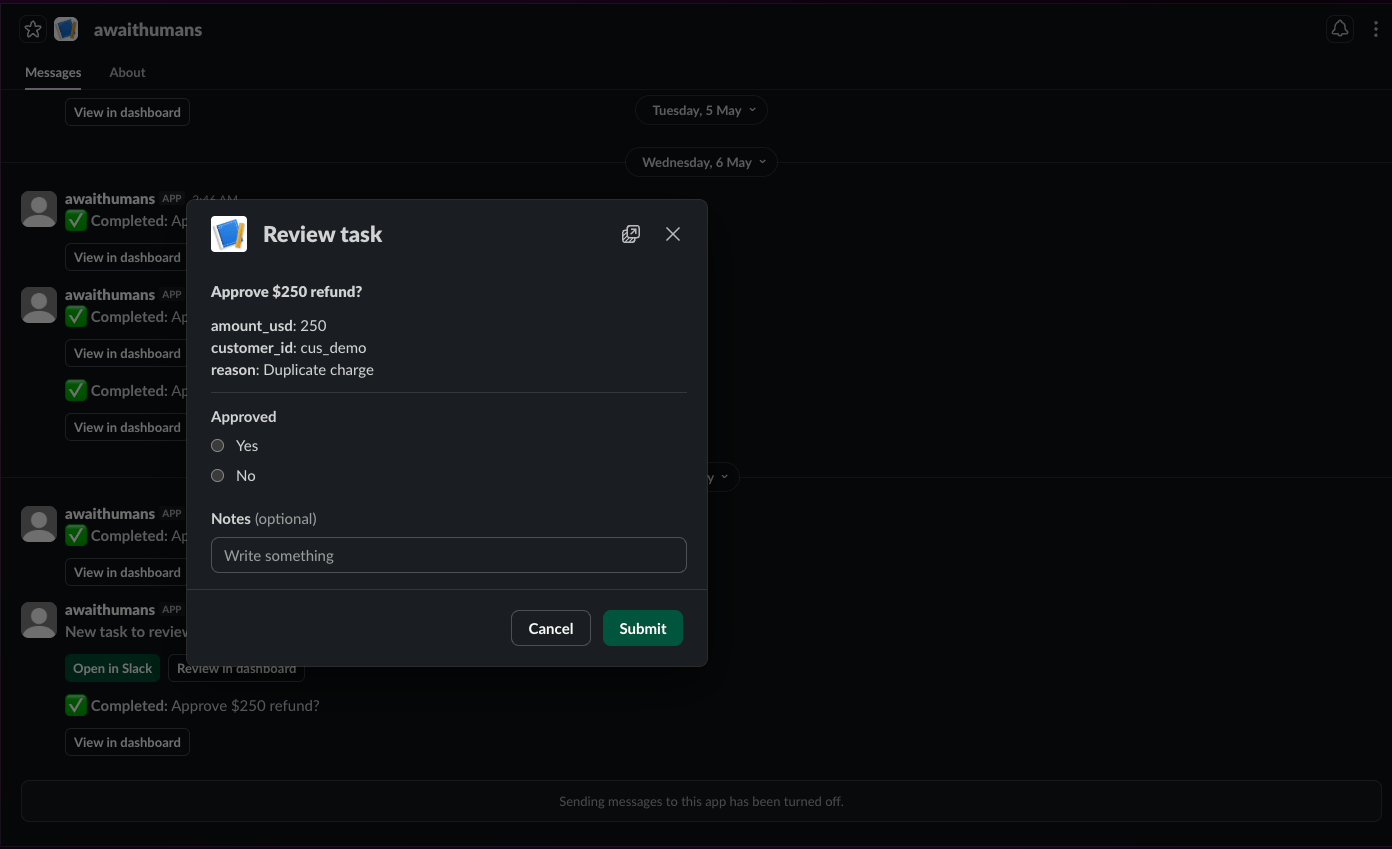 The modal is auto-generated from the response schema's `form_definition`. Fields render as:
| Form kind | Slack block |
| --------------- | ---------------------------- |
| `switch` (bool) | radio buttons (Yes / No) |
| `single_select` | static\_select |
| `multi_select` | multi\_static\_select |
| `short_text` | plain\_text\_input |
| `long_text` | plain\_text\_input multiline |
Complex types (file uploads, images, signatures) fall back to a "Review in dashboard" link.
Both SDKs synthesize `form_definition` from their native schema language — Python via `extract_form()` against a Pydantic model, TypeScript via `extractForm()` against a Zod object schema. A single boolean response in either tongue produces a Switch primitive, which is what the email/Slack renderers use to decide whether to emit inline action shortcuts.
## NL thread replies
A reviewer can reply in the message's thread instead of clicking through the modal. The verifier parses the natural language into the response schema:
```
@bot Approve refund? Customer: cus_demo, $250, duplicate charge.
↳ alice: approve, looks legit
```
If `verifier=` is set on the task and the verifier supports NL parsing (all four built-ins do), the thread text becomes the response. See [Verifier](/adapters/verifier).
## Post-completion message updates
When a task transitions to a terminal state — completed (Slack modal OR dashboard), cancelled by an operator, or timed out by the scheduler — the original Slack message is rewritten via `chat.update`:
```
✅ Completed: Approve $250 refund? — by <@U_ALICE>
[ View in dashboard ] ← signed handoff URL
```
No buttons. The recipient can't accidentally re-trigger the form on a stale DM days later. The "View in dashboard" link stays so audit / replay is one click away.
The update fires as a FastAPI background task after the response so a slow Slack API call never blocks the human's submit. Slack errors are logged, not raised — a Slack outage affects the cosmetic message, not the task lifecycle.
For this to work, the notifier records `(channel, ts, team_id)` in the `slack_task_messages` table on every post. Tasks created before this feature shipped won't have refs — their DMs stay interactive forever.
## Authorization
awaithumans validates the Slack user submitting against the task's assignee:
* Submitter must be in the directory and active
* Submitter must be either the task's assignee OR an operator
* Operators stepping in on someone else's task see an inline banner in the dashboard ("⚠ Assigned to @alice — you're submitting as operator ([ops@acme.com](mailto:ops@acme.com))")
* Anyone else gets a clear ephemeral reply: "This task isn't assigned to you."
The broadcast-claim path doesn't enforce this (it's first-claim-wins by design); the direct-DM and modal-submit paths do.
## Audit identity
`completed_by_email` is the directory user's email when set. For Slack-only users (no email) the audit log surfaces `completed_by_user_id` plus a `completed_by_display_name` derived from `display_name → email → @ → row id`. Operators see consistent attribution across Slack and dashboard completions, even when one of the parties has no email.
## Runnable examples
| Example | Language | What it tests |
| ------------------------------------------------------------------------------------------------------------ | ---------- | -------------------------------------------------------- |
| [`examples/slack-native/`](https://github.com/awaithumans/awaithumans/tree/main/examples/slack-native) | Python | Refund-approval task DM'd to a Slack user; manual review |
| [`examples/slack-native-ts/`](https://github.com/awaithumans/awaithumans/tree/main/examples/slack-native-ts) | TypeScript | Same flow, TS SDK |
Both block until the human reviews. After their click, the SDK resolves with the typed response.
There's no automated Slack smoke equivalent to the email one — Slack's interactivity callback is signed against a per-workspace secret and routes through Slack's own servers, not feasible to drive from a local script. The smoke story for Slack is the integration tests in `tests/slack/`.
## Common gotchas
* **`request_url` mismatch.** Slack tries to verify your interactivity URL. If your awaithumans server moves (ngrok ID rotates, etc.), update the manifest.
* **`SLACK_SIGNING_SECRET` mismatch.** Every interaction gets HMAC-checked. Wrong secret → 401s in your logs.
* **Bot not in channel.** The bot needs to be in the channel you're posting to. Add it manually or via `channels:join` scope.
* **Workspace member cache.** The dashboard's "Pick Slack member" dropdown caches `users.list` results — restart the server to refresh.
* **Slack-only user but no `users:read.email` scope.** The `slack:alice@acme.com` route format needs that scope. Add it to the app manifest and reinstall.
* **DM modal doesn't open.** The recipient isn't in the directory. Add them via Dashboard → Users → Add user.
The modal is auto-generated from the response schema's `form_definition`. Fields render as:
| Form kind | Slack block |
| --------------- | ---------------------------- |
| `switch` (bool) | radio buttons (Yes / No) |
| `single_select` | static\_select |
| `multi_select` | multi\_static\_select |
| `short_text` | plain\_text\_input |
| `long_text` | plain\_text\_input multiline |
Complex types (file uploads, images, signatures) fall back to a "Review in dashboard" link.
Both SDKs synthesize `form_definition` from their native schema language — Python via `extract_form()` against a Pydantic model, TypeScript via `extractForm()` against a Zod object schema. A single boolean response in either tongue produces a Switch primitive, which is what the email/Slack renderers use to decide whether to emit inline action shortcuts.
## NL thread replies
A reviewer can reply in the message's thread instead of clicking through the modal. The verifier parses the natural language into the response schema:
```
@bot Approve refund? Customer: cus_demo, $250, duplicate charge.
↳ alice: approve, looks legit
```
If `verifier=` is set on the task and the verifier supports NL parsing (all four built-ins do), the thread text becomes the response. See [Verifier](/adapters/verifier).
## Post-completion message updates
When a task transitions to a terminal state — completed (Slack modal OR dashboard), cancelled by an operator, or timed out by the scheduler — the original Slack message is rewritten via `chat.update`:
```
✅ Completed: Approve $250 refund? — by <@U_ALICE>
[ View in dashboard ] ← signed handoff URL
```
No buttons. The recipient can't accidentally re-trigger the form on a stale DM days later. The "View in dashboard" link stays so audit / replay is one click away.
The update fires as a FastAPI background task after the response so a slow Slack API call never blocks the human's submit. Slack errors are logged, not raised — a Slack outage affects the cosmetic message, not the task lifecycle.
For this to work, the notifier records `(channel, ts, team_id)` in the `slack_task_messages` table on every post. Tasks created before this feature shipped won't have refs — their DMs stay interactive forever.
## Authorization
awaithumans validates the Slack user submitting against the task's assignee:
* Submitter must be in the directory and active
* Submitter must be either the task's assignee OR an operator
* Operators stepping in on someone else's task see an inline banner in the dashboard ("⚠ Assigned to @alice — you're submitting as operator ([ops@acme.com](mailto:ops@acme.com))")
* Anyone else gets a clear ephemeral reply: "This task isn't assigned to you."
The broadcast-claim path doesn't enforce this (it's first-claim-wins by design); the direct-DM and modal-submit paths do.
## Audit identity
`completed_by_email` is the directory user's email when set. For Slack-only users (no email) the audit log surfaces `completed_by_user_id` plus a `completed_by_display_name` derived from `display_name → email → @ → row id`. Operators see consistent attribution across Slack and dashboard completions, even when one of the parties has no email.
## Runnable examples
| Example | Language | What it tests |
| ------------------------------------------------------------------------------------------------------------ | ---------- | -------------------------------------------------------- |
| [`examples/slack-native/`](https://github.com/awaithumans/awaithumans/tree/main/examples/slack-native) | Python | Refund-approval task DM'd to a Slack user; manual review |
| [`examples/slack-native-ts/`](https://github.com/awaithumans/awaithumans/tree/main/examples/slack-native-ts) | TypeScript | Same flow, TS SDK |
Both block until the human reviews. After their click, the SDK resolves with the typed response.
There's no automated Slack smoke equivalent to the email one — Slack's interactivity callback is signed against a per-workspace secret and routes through Slack's own servers, not feasible to drive from a local script. The smoke story for Slack is the integration tests in `tests/slack/`.
## Common gotchas
* **`request_url` mismatch.** Slack tries to verify your interactivity URL. If your awaithumans server moves (ngrok ID rotates, etc.), update the manifest.
* **`SLACK_SIGNING_SECRET` mismatch.** Every interaction gets HMAC-checked. Wrong secret → 401s in your logs.
* **Bot not in channel.** The bot needs to be in the channel you're posting to. Add it manually or via `channels:join` scope.
* **Workspace member cache.** The dashboard's "Pick Slack member" dropdown caches `users.list` results — restart the server to refresh.
* **Slack-only user but no `users:read.email` scope.** The `slack:alice@acme.com` route format needs that scope. Add it to the app manifest and reinstall.
* **DM modal doesn't open.** The recipient isn't in the directory. Add them via Dashboard → Users → Add user.